
| Acumatica for general contractors is a cloud-based construction ERP that integrates job cost accounting, AIA billing, subcontractor compliance tracking, certified payroll, and project management in a single platform, implemented by Strategies Group, a two-time Acumatica Construction Partner of the Year. |
Acumatica Construction ERP — Implemented by a Two-Time Partner of the Year!
From preconstruction through closeout, Strategies Group configures Acumatica to handle the financial and operational complexity of general contracting — job costing, AIA billing, subcontractor management, WIP, certified payroll, and more.
Schedule a Demo → strategiesgroup.com/schedule-a-demo/
See How We Implement → strategiesgroup.com/services/
This page covers:
- How Acumatica Construction Edition addresses the core pain points of general contracting
- AIA billing automation and progress payment workflows
- Subcontractor compliance tracking and payment holds
- Real-time job cost accounting and committed cost visibility
- Procore and field tool integrations
- Implementation considerations and timeline expectations
- How Acumatica compares to disconnected systems and other construction ERP options
- Why Strategies Group and how our implementation model works
| 🏆 Two-Time Acumatica Construction Partner of the Year
Strategies Group was named Acumatica Construction Partner of the Year at Summit 2025 and Summit 2026 — back-to-back recognition based on implementation volume, customer satisfaction, and depth of construction industry expertise. We are proud members of the Acumatica Presidents Club, reserved for the most elite Gold Certified Acumatica VARs. For general contractors evaluating Acumatica partners, this distinction speaks for itself and let’s you know you’re partnering with a highly skilled team that has implemented this system for more GCs than almost anyone else in the country. |
General Contracting Is Complex. Your ERP Should Handle That, Not Add to It.
We know that as a General contractor, you manage more moving parts than almost any other business. You’re coordinating subcontractors across multiple active jobs, managing lien waivers and insurance certificates for every sub and supplier, submitting AIA pay applications to owners while waiting on retention releases, running certified payroll on prevailing wage jobs, and trying to get a real-time read on job cost against budget – all at the same time. More than 50% of construction firms in the US plan to implement a modern ERP in the next three years, driven largely by the operational limitations of managing that complexity across disconnected spreadsheets and point solutions.
Most software handles one of those things reasonably well. Acumatica handles all of them inside a single cloud ERP platform, with no integration layer between your job cost data, your billing, your compliance tracking, and your financials. When a subcontractor invoice comes in, it posts to job cost in real time. When a change order is approved, it flows through to the AIA billing schedule of values automatically. When a lien waiver is overdue, the system flags it before it becomes a problem. The result: contractors using Acumatica typically report billing cycles that are days shorter and reconciliation work that is measured in hours rather than days per month.
Strategies Group has implemented Acumatica for general contractors across the country, from mid-size regional GCs managing a handful of active jobs to larger firms running multi-entity operations across multiple states. We configure Acumatica to match how general contractors actually operate, not how a demo assumes they do.
Where Acumatica Makes the Biggest Difference for General Contractors
Here’s where Acumatica consistently makes the biggest difference for general contractors:
| The GC Problem | How Acumatica Solves It |
| Managing subcontractor compliance across dozens of active contracts — insurance certs, lien waivers, and bonds tracked in spreadsheets or email threads | Acumatica centralizes every compliance document by vendor and project, with automated alerts when certs are expiring, or waivers are missing before payment is released |
| AIA billing that takes days to prepare and is error-prone when job cost data lives in a separate system | Acumatica generates G702 and G703 pay applications directly from live job cost data — no re-entry, no reconciliation between systems |
| No real-time view of job cost until month-end reports are run | Committed costs, actual costs, and budget variances update in real time as transactions post — visible to both accounting and project management |
| Certified payroll and prevailing wage tracking that requires manual calculations or a separate tool | Acumatica supports multiple union locals, benefit packages, certified wage rates, and certified payroll report generation natively |
| Change orders that don’t make it into billing or aren’t tracked against the schedule of values | Approved change orders flow automatically into the contract SOV and update AIA billing amounts and project budgets simultaneously |
| Procore or other field tools that don’t talk to your accounting system without a costly integration | Acumatica integrates natively with Procore through a documented open API — field data and financial data stay in sync without middleware |
AIA Billing Built Into Your ERP — Not Bolted On
AIA billing — the G702 Application for Payment and G703 Continuation Sheet — is the standard billing format for commercial general contractors. When your billing lives in a separate tool from your job cost data, preparing each pay application means manually reconciling two systems, which is where errors happen, and payment delays start.
In Acumatica, AIA billing is generated directly from live contract and job cost data. The schedule of values is built from your contract, approved change orders update it automatically, and when it’s time to bill, Acumatica compiles the G702 and G703 from actual cost data without any manual re-entry. Retainage percentages are calculated automatically. Stored materials can be added to the billing. Supporting documents (lien waivers, insurance certificates, and delivery receipts) are attached directly to the pay application in the same system.
The result: pay applications go out faster, with fewer errors, and with a complete audit trail from contract to cash.
- G702 and G703 generated automatically from live job cost and contract data
- Approved change orders flow into the SOV and billing amounts automatically
- Retainage tracked and released based on project-level rules
- Blended Time-and-Material and Progress billing supported on the same project
- Supporting documents attached to pay applications in the same platform
- Full audit trail from contract execution through final payment
Subcontractor Management That Keeps Compliance From Falling Through the Cracks
General contractors carry compliance risk for every subcontractor on every job. An expired certificate of insurance, a missing lien waiver, an unverified bond — any of these can create liability, delay payment, or hold up a project closeout. When compliance tracking lives in spreadsheets, someone always has to chase it manually.
Acumatica centralizes subcontractor compliance in the same system as your contracts, purchase orders, and job cost data. Every vendor record can store insurance certificates, lien waiver requirements, bond information, and license documentation. Automated alerts fire before expiration dates, so your team is never caught off guard. Payment holds can be configured to prevent releasing payment to a sub until their compliance documents are current.
Beyond compliance, Acumatica tracks every subcontract commitment against the job budget in real time. Your project manager and your accounting team see the same committed cost data — open subcontract balances, approved change orders to subs, amounts billed versus amounts owed — without anyone having to run a report or send a status email.
- Insurance certificates, lien waivers, and bonds are stored and tracked per vendor and project
- Automated alerts before compliance documents expire
- Payment holds prevent releasing funds to non-compliant subcontractors
- Subcontract commitments visible in real-time job cost against budget
- Change orders to subcontractors tracked against the original subcontract value
- Lien waiver workflows, both conditional and unconditional, managed within the system
Real-Time Job Cost Accounting: Know Where Every Job Stands Before Closeout
The most common financial failure point for general contractors isn’t a bad estimate. It’s finding out a job went over budget weeks after the overrun started. When job cost data requires manual updates or runs through a month-end close process before it’s visible, project managers are always looking at history instead of the current state of the job.
Acumatica posts every labor hour, material receipt, equipment charge, and subcontractor invoice to job cost in real time. Project managers can see actual costs against budget, committed costs from open purchase orders and subcontracts, and the projected cost at completion — all from a single project dashboard, from any device, from anywhere.
That real-time visibility also makes estimating better over time. When every completed job feeds clean cost data back into the system, your historical cost data for labor productivity, material pricing, and subcontractor performance becomes the foundation for more accurate future bids.
- Actual costs post to job cost in real time as transactions are entered
- Committed costs from open POs and subcontracts visible alongside actuals
- Budget vs. actual reporting available by job, phase, cost code, and cost type
- Projected cost at completion calculated automatically as actuals come in
- Role-based dashboards give project managers and executives different views of the same data
- Historical job cost data feeds future estimate accuracy
Acumatica Connects With Procore and the Field Tools You Already Use
Most general contractors have already invested in field tools — Procore for project management, STACK or Trimble for estimating, Workforce Go or a payroll platform for labor. The question isn’t whether to replace those tools. It’s whether your ERP can connect to them without a brittle, expensive integration that breaks every time either system updates.
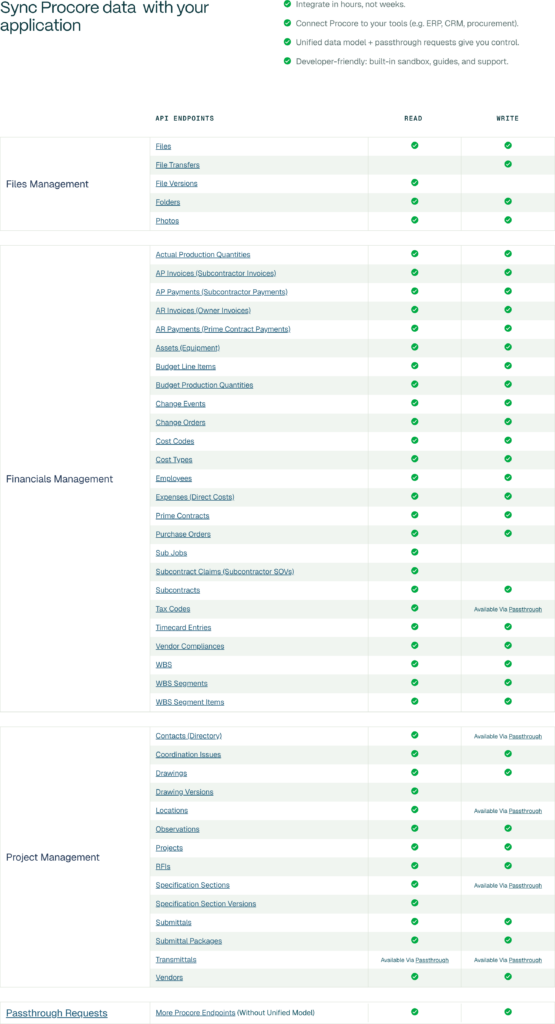
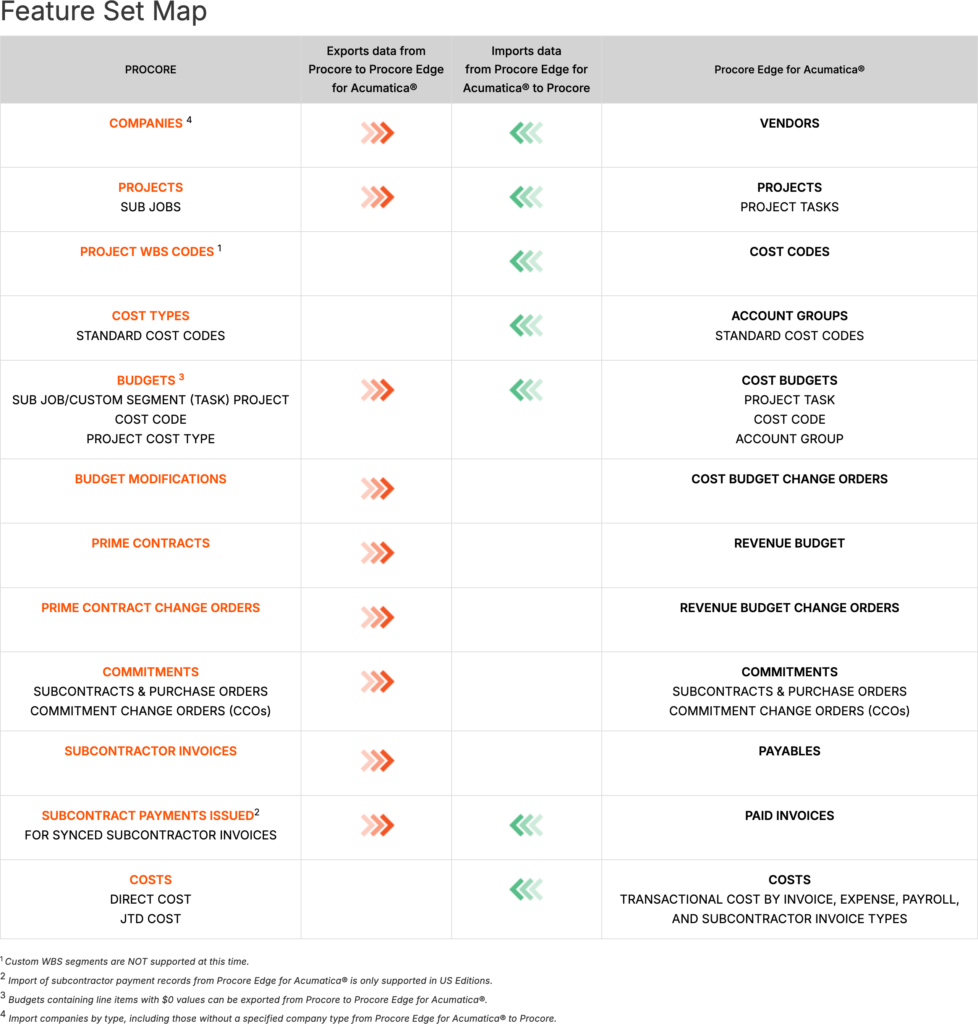
Acumatica connects to Procore through two routes, and Strategies Group leverages both depending on what a client needs. The first is Acumatica’s native open REST API — a direct connection that syncs project data, commitments, and change orders between the field and the back office without duplicate entry. The second is Agave, a dedicated Procore-to-Acumatica sync connector available in the Procore Marketplace. Agave goes beyond the native connector in several meaningful ways: it supports bidirectional sync for purchase orders, subcontracts, prime contracts, owner invoices, employees, and timesheets, with automatic syncing and a full error log and audit trail. For contractors whose workflows require a deeper, more automated sync — particularly around AP, subcontract management, and workforce data — Agave is the more capable option.
The same open API approach extends to the rest of your stack: estimating platforms, payroll providers, tax compliance tools, document management systems, and industry-specific ISVs.
- Procore (native Acumatica connector — project data, commitments, change orders)
- Procore via Agave — bidirectional sync including POs, subcontracts, owner invoices, employees, and timesheets; automatic syncing with error log and audit trail
- STACK and Trimble (estimating)
- Workforce Go (payroll and workforce management)
- Traild (AP automation solution)
- Avalara (tax compliance)
- Velixo (Excel-based reporting and analytics)
- Custom integrations via Acumatica’s open REST API
How Acumatica Compares: Disconnected Systems vs. Acumatica vs. Other Construction ERP
General contractors evaluating construction software typically compare three scenarios: continuing with a disconnected stack of QuickBooks, Excel, and Procore; implementing Acumatica Construction Edition; or choosing another construction-specific ERP. Here’s how those options compare across the capabilities that matter most for GC operations:
|
QuickBooks + Excel + Procore(disconnected) |
Acumatica Construction Edition |
Other Construction ERP Options |
|
|
Job cost accounting |
Manual — end of month reconciliation |
Real-time — posts as transactions occur |
Varies — some real-time, some batch |
|
AIA billing (G702/G703) |
Spreadsheet — hours of manual preparation |
Automated from live contract data |
Varies — often requires separate tool |
|
Subcontractor compliance |
Email threads, spreadsheets, manual follow-up |
Centralized tracking with automated alerts and payment holds |
Varies — often bolt-on module |
|
Procore integration |
Manual export/import or expensive middleware |
Native open API connection, pre-built 3rd party connectors |
Varies widely |
|
Certified payroll |
Manual calculations or separate software |
Native — multiple unions, locals, wage classifications |
Varies — often add-on cost |
|
Licensing model |
Per user — costs grow with headcount |
Transaction-based — unlimited users |
Mostly per user |
|
Data access |
Desktop-bound or VPN required |
True cloud — any device, any location |
Most are cloud-based |
|
Retainage tracking |
Manual calculation and ledger entries |
Automated per project contract rules |
Generally supported |
The unlimited-user licensing model is particularly significant for general contractors with large project teams, seasonal workforce fluctuations, or subcontractors who need system access. Most competing platforms charge per seat — costs that compound quickly as headcount grows.
What to Expect When Implementing Acumatica as a General Contractor
Moving from disconnected systems to a unified construction ERP is a significant operational change. Understanding what implementation involves — and what separates a smooth go-live from a troubled one — helps general contractors plan realistically and choose the right partner.
Timeline: What to Expect
A well-scoped Acumatica implementation for a general contractor typically targets a 4–6 month timeline for Phase 1, compared to the industry average of 9–12 months for general ERP deployments. Strategies Group uses a phased approach that prioritizes your most critical business processes — job cost accounting, AIA billing, and subcontractor management — and delivers a go-live on those before adding additional modules.
Data Migration from QuickBooks, Excel, and Legacy Systems
Migration from QuickBooks, Sage 300 CRE, Sage 100 Contractor, or spreadsheet environments requires careful planning. Active project budgets, cost code structures, vendor records, and customer contracts need a clean migration into Acumatica. Historical data typically archives or migrates in summary rather than in full, remaining accessible without cluttering the live system. The most important pre-migration step is data governance: standardizing cost codes, eliminating duplicate vendor records, and establishing naming conventions before migration prevents those inconsistencies from carrying forward.
Chart of Accounts and WIP Configuration
Construction accounting requires job-centric chart of accounts structures that differ from standard business accounting. Cost codes and phases must map to budgets, billing line items, and reporting categories. Work-in-progress (WIP) accounting configuration is critical for proper revenue recognition across ongoing projects. Getting this structure right during implementation prevents painful restructuring later — and it’s an area where deep construction ERP experience pays off significantly.
Common Implementation Challenges — and How Strategies Group Addresses Them
- Field crew adoption: Mobile-first training with simplified time entry interfaces keeps crews on the system after go-live. We pilot workflows with receptive crews first, gather feedback, and refine before broader rollout.
- Custom bonding and compliance reports: Bonding companies often require specific WIP schedule formats. We build and test these reports against actual audit requirements during implementation — not after go-live.
- Multi-entity structures: General contractors with related entities, JV structures, or holding companies need an intercompany accounting configuration that reflects how the business actually operates. We scope this during discovery, not as a post-go-live surprise.
- Change management: ERP implementations touch every department. We include structured change management — role-based training, go-live support, and a stabilization period — as a standard part of every engagement.
Why General Contractors Choose Strategies Group to Implement Acumatica
There are over 200 certified Acumatica partners. Most implement Acumatica as one of several ERP platforms they support. Strategies Group has focused exclusively on Acumatica since 2018 — no other ERP, no split attention. Every consultant on our team works in Acumatica every day. That depth shows up in how we configure the system and how quickly we solve problems when they arise.
We’ve honed our experience in the Construction space and have been named Acumatica Construction Partner of the Year two years in a row.Our customers have been named Acumatica Construction Customer of the Year in both 2025 and 2026 as well! Those recognitions reflect not just sales volume but the quality of what we deliver — verified by Acumatica through customer satisfaction scores and implementation outcomes.
Our implementation follows a 6D methodology: Align, Discover, Design, Deploy, Deliver, and Maintain & Optimize. We don’t consider the engagement complete at go-live. Every client is assigned a dedicated Customer Success Manager who conducts quarterly check-ins, annual system evaluations, and ongoing optimization work to make sure Acumatica keeps pace with how your business grows.
- Exclusive Acumatica focus since 2018 — no other ERP platform
- Two-time Acumatica Construction Partner of the Year (2025 & 2026)
- Acumatica Presidents Club member — one of the top-performing Gold Certified VARs
- Dedicated Customer Success Manager assigned at project start, not just at go-live
- Quarterly check-ins and annual system evaluations are included in the support model
- Deep bench of consultants with direct construction industry experience
|
Testimonials “Strategies Group has been an exceptional partner throughout our Acumatica implementation and beyond. Their team combines deep industry knowledge with technical expertise, making it easy to trust their recommendations and rely on their support. They’ve been responsive, collaborative, and genuinely invested in our success. They tailored solutions to fit our unique workflows and helped us unlock automation opportunities that have significantly improved our efficiency.” – Morgan Hampson, Landmark Properties, Developer & General Contractor |
Frequently Asked Questions: Acumatica for General Contractors
Is Acumatica designed for general contractors specifically?
Yes. Acumatica Construction Edition includes purpose-built features for general contractors: AIA G702/G703 billing, job cost accounting by phase and cost code, subcontractor compliance tracking, certified payroll, change order management, and Procore integration. These aren’t add-ons — they’re native to the construction edition.
How does Acumatica handle AIA billing?
Acumatica generates AIA pay applications directly from live contract and job cost data. The schedule of values is built from your contract, approved change orders update it automatically, and the G702 and G703 are compiled without manual re-entry. Retainage is tracked and released per project rules, and supporting documents are attached within the same system.
Can Acumatica manage subcontractor compliance documents?
Yes. Acumatica stores and tracks insurance certificates, lien waivers, bonds, and other compliance documents by vendor and project. Automated alerts fire before expiration dates, and payment holds can be configured to prevent releasing payment to non-compliant subcontractors.
Does Acumatica integrate with Procore?
Yes. Acumatica integrates with Procore through a native, documented connector using Acumatica’s open REST API. Project data, commitments, and change orders stay synchronized between the field and the back office without duplicate entry.
How is Acumatica priced for general contractors?
Acumatica uses a consumption-based pricing model based on transaction volume and computing resources — not the number of users. Your entire team can access the system at every license tier without per-seat fees. This is a structural advantage over competing ERP platforms that charge per user, especially for GCs with large project teams and seasonal workforce fluctuations.
How long does an Acumatica implementation take for a general contractor?
Strategies Group targets a 4–6 month timeline for a well-scoped Phase 1, compared to the industry average of 9–12 months. We use a phased approach that prioritizes your most critical business processes and delivers measurable value before the full system is live.
What data can be migrated from QuickBooks or Sage to Acumatica?
Active project budgets, cost code structures, vendor and subcontractor records, and customer contracts are migrated. Historical data typically archives rather than migrates in full. Strategies Group handles data cleansing and migration planning as part of the implementation process — including standardizing cost codes and normalizing vendor records before any data moves.
What makes Strategies Group different from other Acumatica partners?
Strategies Group has focused exclusively on Acumatica since 2018 and has been named Acumatica Construction Partner of the Year in both 2025 and 2026. Our implementation team includes consultants with direct construction industry experience, and every client is assigned a dedicated Customer Success Manager who stays engaged long after go-live.
Ready to See Acumatica in Action for Your GC Business?
Our approach to the sales process is the same as our approach to implementation: we’re not trying to convince you that Acumatica is the right fit. We want to understand how your business operates, show you how Acumatica would handle your specific workflows, and be clearwith you about whether this is the right move before either of us commits to anything.
Schedule a no-commitment needs assessment with a Strategies Group Acumatica expert. We’ll walk through your current systems, identify the gaps, and give you a clear picture of what an implementation would look like for your business.
Schedule a Demo → strategiesgroup.com/schedule-a-demo/